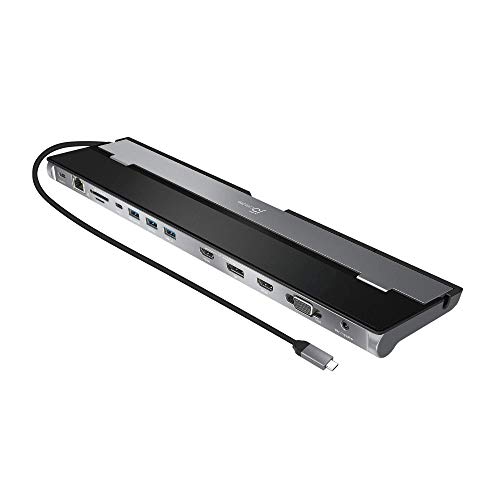
Consider it for
- Retaining a VGA screen in a three-monitor office
- A workstation with mixed HDMI and DisplayPort equipment
Check before buying
- Maximum three external screens despite four video sockets.
- Triple-screen combinations include VGA; 4K is limited to 30Hz.
- Requires j5create display driver and USB-C video support; up to 100W pass-through needs a separate charger.
The VGA monitor changes the decision
A legacy monitor is often the reason to consider this dock. j5create documents triple-screen combinations using HDMI, VGA and either DisplayPort or the other HDMI output. Those last two are alternatives in the supported combinations. Counting connectors would overstate the workspace you can build.
The digital outputs reach 4K at 30Hz, while VGA is limited to 1080p. That makes the JCD543 a plausible way to preserve older office equipment, but a poor match for somebody expecting three new 4K60 displays. Draw the intended cables on paper first; an HDMI-only shopping list misses the main condition of its triple-display arrangement.
Check the exact configuration and included power supply.
Check on AmazonPrepare the computer before moving the desk
Windows and macOS require the manufacturer’s display software. USB-C DisplayPort Alt Mode is also part of the stated host requirements, so a data-only USB-C connection should not be treated as a full match. Power comes through a separate USB-C adapter in the standard JCD543 package. The similarly named JCD543P is the charger bundle, rather than a reason to count another distinct display platform.
Card readers, Gigabit Ethernet and four USB data ports reduce the need for separate everyday adapters. Keep higher-powered storage in mind: the manufacturer advises connecting no more than one portable bus-powered hard drive at a time. A powered desk arrangement is the more practical starting point for this particular dock.
Connections & compatibility
- Connection to laptop
- USB-C with DisplayPort Alt Mode
- Display technology
- Check model documentation
- Maximum displays (conditions apply)
- 3 displays maximum
- Power to laptop (W)
- 100W published host power
- HDMI sockets
- 2
- DisplayPort sockets
- 1
- Wired network
- Gigabit Ethernet
- USB peripherals
- 3 USB-A and 1 USB-C data ports, 5Gbps
- Display requirements
- HDMI + VGA + DisplayPort or HDMI; digital 4K30, VGA 1080p60
- Mac notes
- Driver required; observe manufacturer mode restrictions
- Windows notes
- Windows 10 or later with manufacturer driver
These are published specifications, not results from hands-on testing. Maximum screen counts depend on the laptop, operating system, connection and chosen resolution.
Check your setup requirementsSources & specifications
Research checked October 6, 2026. Product revisions, firmware and operating systems can change compatibility.
Review the current listing
Confirm model, condition, seller, included cables and power supply before ordering.
Check on AmazonAs an Amazon Associate I earn from qualifying purchases. How our links work.


